Raspberry Pi Desktop is back for PC and Mac: a second life for an old computer
Raspberry Pi has released a new 64-bit PC and Mac edition of its desktop, based on Debian Trixie. It runs from a USB stick or installs to disk, and it will not run on Apple Silicon.
By OwnYourStack Admin · Published
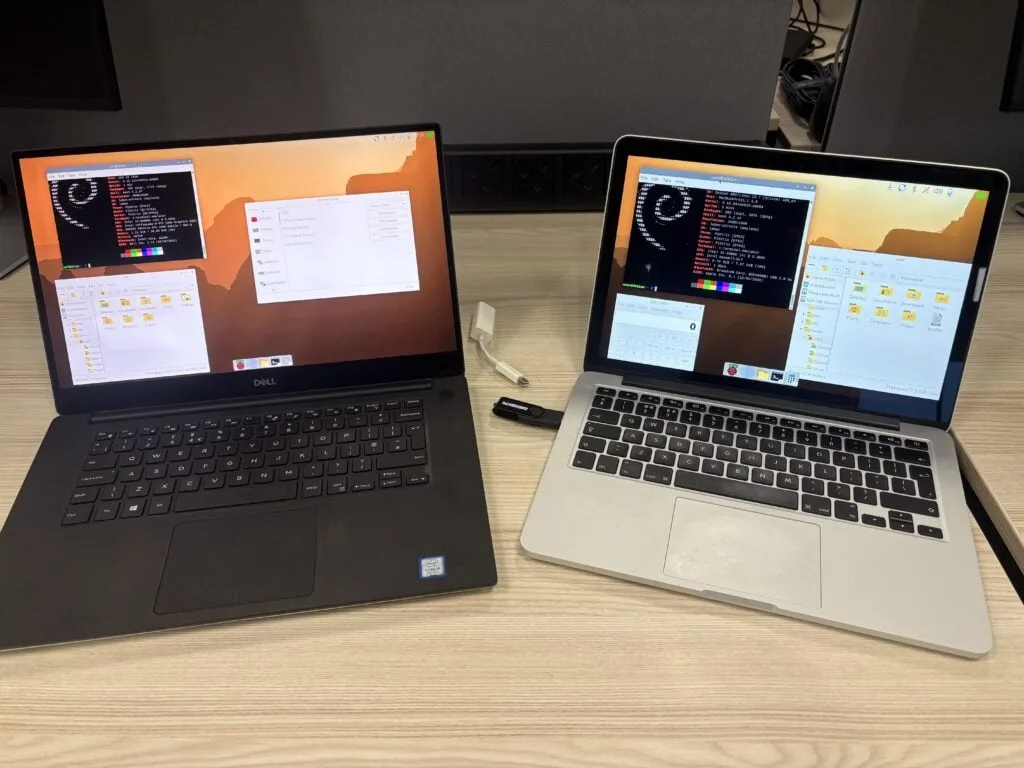
On 6 October 2026, Raspberry Pi released a new build of its desktop environment for ordinary computers. Written up by Simon Long on the Raspberry Pi news site, Raspberry Pi Desktop for PC and Mac is now based on Debian Trixie and is available as a live .iso from the Raspberry Pi operating systems page. If you have an old laptop in a drawer, it is a free way to turn it into a light, familiar machine, and perhaps a small home server or a remote-control point for your Pis.
What you get
- 64-bit only. The build is amd64. Debian has dropped 32-bit support for PC architectures, so very old 32-bit machines are out.
- The newer desktop. It includes the recent Raspberry Pi desktop changes, such as the Control Centre and the new dock.
- Raspberry Pi Connect. A Connect client is included, so a PC or Mac can be used to control Raspberry Pi devices, and be controlled alongside them.
Will it run on your computer?
Raspberry Pi gives no exact CPU, memory or storage figures. It says that most PCs made in roughly the last 15 years should run the 64-bit version, and that most Intel-based Macs should too. Apple Silicon Macs are not supported, because Debian support for them is still experimental, and Simon Long said in the comments that there are no current plans for an Arm build for M-series Macs.
Drivers are the usual catch. Screen scaling and Wi-Fi depend on Debian including the right driver for your hardware, and you may have to find and install one yourself (readers pointed to Broadcom drivers for some Macs). Check that your Wi-Fi works from the live USB before you commit to an installation.
Two ways to use it
| Method | How | Good for |
|---|---|---|
| Live USB | Flash the ISO to a USB stick and boot from it. Choose “run with persistence” to keep your changes on the stick; a menu option resets it to a clean image. | Trying it with no risk to the installed system |
| Install to disk | Run the Calamares installer from the desktop shortcut, or from System Tools, “Install Raspberry Pi OS”. | Reviving an old PC permanently. This overwrites the existing operating system. |
Things to know before you start
- No upgrade path. It is a complete replacement. You cannot upgrade from the older 32-bit release.
- Virtual machines are unofficial. The article gives no VM instructions, and Simon Long said he had not tried it under WSL. Some readers reported a blank screen on VMware and problems on VirtualBox, with QEMU working. Those are community reports, not confirmed by Raspberry Pi.
- Support depends on demand. The project began in 2016 as an experiment to run the Pi desktop on a Mac, and updates stopped for a time because the software is free and hard to justify in engineering time. Raspberry Pi says it intends to keep supporting this release, depending on how many people download and use it.
Our view
For a home lab, this is most useful as a tidy, familiar desktop for an old machine: a media or kiosk screen, a small utility box, or a spare laptop you can reach through Connect. It is not a server distribution, and for services you would still reach for Debian or Ubuntu Server (see our look at Ubuntu 26.10 if you are choosing). If your plan is to buy a Pi instead, read what a Raspberry Pi costs in late 2026 first: reusing hardware you already own may be the cheaper route.
Source: Raspberry Pi news, 6 October 2026, by Simon Long.